Creating a New Station GUI
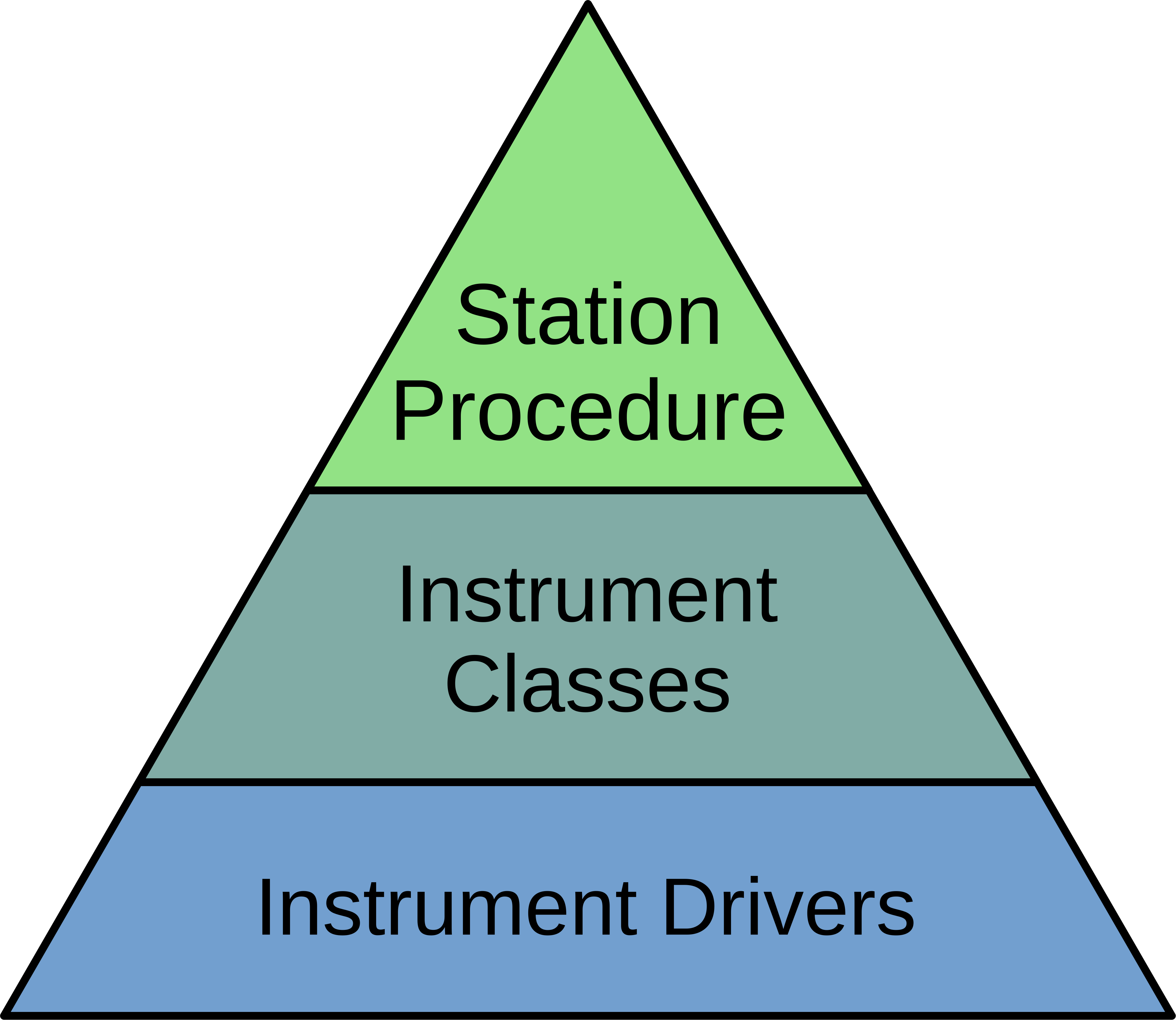
Each station GUI consists of three components:
Low-level drivers for communicating with connected instruments
Mid-level instrument classes that adapt drivers to the requirements of a NUPyLab procedure
A high-level procedure that executes the steps of an experiment
Drivers
Drivers are the base and the most important component for creating a station GUI. Getting a new station up and running starts with creating or obtaining drivers for each instrument. The types of drivers generally fall into three camps:
1. Text-based communication over a serial connection, which may adhere to a protocol like SCPI or some other format. Examples:
Proterial ROD-4A MFC Controller
Keithely 2182A Nanovoltmeter
Agilent 4284A LCR Meter
Serial communication by a non-text protocol. Examples:
Eurotherm (MODBUS protocol)
Omron (CompoWay/F protocol)
Communication by a pre-compiled library. Examples:
Biologic (EC-Lab Development Package)
LabJack U12 (ljackuw.dll)
Text-Based Serial Drivers
Text-based serial communication is the most common method of instrument
control. Writing a driver is principally translating the text format required
by the instrument to a user-friendly representation. For example, the Keithley
2182 driver allows the user to set the thermocouple type by writing
keithley.thermocouple = 'S', which sends ":SENS:TEMP:TC S" to
the instrument.
A significant number of common instruments already have Python-based drivers in the PyMeasure library. PyMeasure is well-maintained, well-documented, features useful functions for creating instrument properties and channels, and frequently adds new drivers. Drivers that are compatible with PyMeasure should be contributed and hosted there to be made more widely available.
pymeasure.instruments.proterial.rod4 excerpt:
class ROD4Channel(Channel):
"""Implementation of a ROD-4 MFC channel."""

actual_flow = Channel.measurement(
    "\x020{ch}RFX",
    """Measure the actual flow in %."""
)

setpoint = Channel.control(
    "\x020{ch}RFD", "\x020{ch}SFD%.1f",
    """Control the setpoint in % of MFC range.""",
    validator=truncated_range,
    values=[0, 100],
    check_set_errors=True
)

mfc_range = Channel.control(
    "\x020{ch}RFK", "\x020{ch}SFK%d",
    """Control the MFC range in sccm.
    Upper limit is 200 slm.""",
    validator=truncated_range,
    values=[0, 200000],
    check_set_errors=True
)

...

class ROD4(Instrument):
"""Represents the Proterial ROD-4(A) operator for mass flow controllers
and provides a high-level interface for interacting with the instrument.
User must specify which channel to control (1-4).

.. code-block:: python

    rod4 = ROD4("ASRL1::INSTR")

    print(rod4.version)             # Print version and series number
    rod4.ch_1.mfc_range = 500       # Sets Channel 1 MFC range to 500 sccm
    rod4.ch_2.valve_mode = 'flow'   # Sets Channel 2 MFC to flow control
    rod4.ch_3.setpoint = 50         # Sets Channel 3 MFC to flow at 50% of full range
    print(rod4.ch_4.actual_flow)    # Prints Channel 4 actual MFC flow in %

"""

def __init__(self, adapter, name="ROD-4 MFC Controller", **kwargs):
    super().__init__(
        adapter, name, read_termination='\r', write_termination='\r',
        includeSCPI=False, **kwargs
    )

ch_1 = Instrument.ChannelCreator(ROD4Channel, 1)
ch_2 = Instrument.ChannelCreator(ROD4Channel, 2)
ch_3 = Instrument.ChannelCreator(ROD4Channel, 3)
ch_4 = Instrument.ChannelCreator(ROD4Channel, 4)

version = Instrument.measurement(
    "\x0201RVN",
    """Get the version and series number. Returns x.xx<TAB>S/N """
)
Non-Text Serial Drivers
Drivers that communicate by serial but not by sending typical ASCII characters
are maintained in the NUPyLab repository. Protocols are handled on a
case-by-case basis, but the typical behavior is sending commands to read and
write the register addresses where data is stored. Both the MODBUS protocol
used by Eurotherm and the CompoWay/F protocol used by Omron operate in this
way. Similarly to the text-based serial drivers in PyMeasure, reading and
writing commands are implemented as class properties. For example, the user
would access the current temperature from a Eurotherm furnace controller by
writing eurotherm.process_value, which behind the scenes sends a
command to the Eurotherm to read register address 1.
PyMeasure may expand to support protocols like MODBUS in the future, in which case compatible drivers may be migrated from NUPyLab to PyMeasure.
drivers.eurotherm2200 excerpt:
class Eurotherm2200(minimalmodbus.Instrument):
    """Instrument class for Eurotherm 2200 series process controller.

    Attributes:
        serial: pySerial serial port object, for setting data transfer parameters.
        setpoints: dict of available setpoints.
        programs: list of available programs, each program containing a list of segment
            dictionaries.
    """

    def __init__(self,
                 port: str,
                 clientaddress: int,
                 baudrate: int = 9600,
                 timeout: float = 1,
                 **kwargs) -> None:
        """Connect to Eurotherm and initialize program and setpoint list.

        Args:
            port: port name to connect to, e.g. `COM1`.
            clientaddress: integer address of Eurotherm in the range of 1 to 254.
            baudrate: baud rate, one of 9600 (default), 19200, 4800, 2400, or 1200.
            timeout: timeout for communication in seconds.
        """
        super().__init__(port, clientaddress)
        self.serial.baudrate = baudrate
        self.serial.timeout = timeout

    ...

    @property
    def process_value(self):
        """Process variable."""
        return self.read_float(1)

    @property
    def output_level(self):
        """Power output in percent."""
        return self.read_float(3)

    @property
    def target_setpoint(self):
        """Target setpoint (if in manual mode)."""
        return self.read_float(2)

    @target_setpoint.setter
    def target_setpoint(self, val: float):
        self.write_float(2, val)
Pre-Compiled Library Drivers
The last category of instrument drivers, also hosted on the NUPyLab repository, are those that communicate through a pre-compiled library, typically a .dll file. Interfacing with Python is done through the ctypes library, which is used for loading and accessing functions in the .dll file. In this case, the driver is responsible for
implementing calls to the .dll file as class methods (or separate functions)
translating between Python and C data types
The end result is that the user should be able to use the driver with
conventional Python language. For example, connecting to a Biologic
potentiostat looks like biologic.connect(), with the driver calling the
appropriate library function in the background.
Due to license restrictions, .dll files and other components of software development kits are not distributed as part of the NUPyLab repository and must be obtained from the instrument manufacturer. Members of the Haile Group can also download the libraries as part of the private nupylab-extras repository in GitHub.
drivers.biologic excerpt:
class BiologicPotentiostat:
    """Driver for BioLogic potentiostats that can be controlled by the EC-lib DLL.

    Raises:
        ECLibError: All regular methods in this class use the EC-lib DLL
            communications library to talk with the equipment and they will
            raise this exception if this library reports an error. It will not
            be explicitly mentioned in every single method.
    """

    def __init__(
            self, model: str, address: str, eclib_path: Optional[str] = None
    ) -> None:
        r"""Initialize the potentiostat driver.

        Args:
            model: The device model e.g. 'SP200'
            address: The address of the instrument, either IP address or 'USB0', 'USB1',
                etc.
            eclib_path: The path to the directory containing the EClib DLL. The default
                directory of the DLL is
                C:\EC-Lab Development Package\EC-Lab Development Package\.
                If no value is given the default location will be used. The 32/64 bit
                status is inferred for selecting the proper DLL file.

        Raises:
            WindowsError: If the EClib DLL cannot be found
        """
        model = 'KBIO_DEV_' + model.replace("-", "").replace(" ", "").upper()
        self.model = model
        if model in SP300SERIES:
            self.series = 'sp300'
        elif model in VMP3SERIES:
            self.series = 'vmp3'
        else:
            message = 'Unrecognized device type: must be in SP300 or VMP3 series.'
            raise ECLibCustomException(-8000, message)

        self.address = address
        self._id: Optional[c_int32] = None
        self._device_info: Optional[DeviceInfos] = None

        # Load the EClib dll
        if eclib_path is None:
            eclib_path = (
                'C:\\EC-Lab Development Package\\EC-Lab Development Package\\'
            )

            # Check whether this is 64 bit Windows (not whether Python is 64 bit)
        if 'PROGRAMFILES(X86)' in os.environ:
            eclib_dll_path = eclib_path + 'EClib64.dll'
            blfind_dll_path = eclib_path + 'blfind64.dll'
        else:
            eclib_dll_path = eclib_path + 'EClib.dll'
            blfind_dll_path = eclib_path + 'blfind64.dll'

        self._eclib = WinDLL(eclib_dll_path)
        self._blfind = WinDLL(blfind_dll_path)

    ...

    def connect(self, timeout: int = 5) -> Optional[dict]:
        """Connect to the instrument and return the device info.

        Args:
            timeout: The connect timeout

        Returns:
            The device information as a dict or None if the device is not connected.

        Raises:
            ECLibCustomException if this class does not match the device type
        """
        address: bytes = self.address.encode('utf-8')
        self._id = c_int32()
        device_info: DeviceInfos = DeviceInfos()
        ret: int = self._eclib.BL_Connect(
            address, timeout, byref(self._id), byref(device_info)
        )
        self.check_eclib_return_code(ret)
        if DEVICE_CODES[device_info.DeviceCode] != self.model:
            message = ("The device type "
                       f"({DEVICE_CODES[device_info.DeviceCode]}) "
                       "returned from the device on connect does not match "
                       f"the device type of the class ({self.model})."
                       )
            raise ECLibCustomException(-9000, message)
        self._device_info = device_info
        return self.device_info
Instrument Classes
Once a driver is ready, the next step is to adapt it to a standardized form for
use in a NUPyLab procedure. These are instrument classes, grouped by function,
so instruments that perform similar functions can be used (nearly)
interchangeably. The instruments.heater submodule contains classes for all the
Eurotherm and Omron furnace controllers, instruments.ac_potentiostat
submodule contains classes for the Biologic and Agilent 4284A, for instance.
Each instrument class subclasses NupylabInstrument and consists of
connect, set_parameters, start, get_data, stop_measurement, and shutdown methods
connected and finished properties
data_label attribute
Procedures will connect to each instrument once and shutdown upon finishing or aborting the experiment. Each step of the procedure sets instrument parameters, starts the measurement, gets data at each recording interval, and stops measurement when the step is complete.
The connected and finished properties are checked by the
procedure to ensure all instruments active in the current step are connected
and to monitor whether the current measurement step is finished, respectively.
The data_label attribute is required for matching results reported by
the instrument’s get_data method and the procedure’s
DATA_COLUMNS attribute.
Important
All code that communicates with the instrument should be inside
a with self.lock statement to prevent separate threads from making
overlapping calls to the instrument, which can cause communication errors.
Procedures
NUPyLab procedures use PyMeasure’s procedure and graphical tools, with some slight modifications, the main being the addition of a table for setting measurement parameters. Each procedure class will have attributes in the form of PyMeasure Parameters for setting measurement parameters and instrument connection settings. It is highly recommended to read through PyMeasure’s tutorial before writing a NUPyLab procedure.
Procedure classes for stations subclass NupylabProcedure, which enforces the required class structure. In addition to the PyMeasure Parameters mentioned above, each procedure must have:
TABLE_PARAMETERSattribute: dictionary for mapping parameters table columns to appropriate attributes. Each key is the string name of a column, and values are string representations of the parameters the column values should be assigned to.set_instrumentsmethod: establishes instrument connections for active instruments or passes connections from previous measurement step, as well as sending current measurement step parameters to the active instrument classes. It is important that this method createinstrumentsandactive_instrumentsattributes.INPUTSattribute: list of strings of parameter names that are set in the left-hand pane, rather than in the parameters table. These are static parameters that are fixed for all measurement steps, typically the recording time and instrument port settings.
A number of requirements are also imposed by PyMeasure:
DATA_COLUMNSattribute: list of strings for column headers in recorded data file. The first two entries should be"System Time"and"Time (s)".X_AXISattribute: list of strings corresponding to entries in DATA_COLUMNS to plot along x axes in docked plotsY_AXISattribute: list of strings corresponding to entries in DATA_COLUMNS to plot along y axes in docked plots
The number of plots created in the docked window tab is determined by the length of X_AXIS or Y_AXIS, whichever is longer.
gui.s8_gui.py excerpt:
class S8Procedure(nupylab_procedure.NupylabProcedure):
    """Procedure for running high impedance station GUI.

    Running this procedure calls startup, execute, and shutdown methods sequentially.
    In addition to the parameters listed below, this procedure inherits `record_time`,
    `num_steps`, and `current_steps` from parent class.
    """

    # Units in parentheses must be valid pint units
    # First two entries must be "System Time" and "Time (s)"
    DATA_COLUMNS: List[str] = [
        "System Time",
        "Time (s)",
        "Furnace Temperature (degC)",
        "Ewe (V)",
        "Frequency (Hz)",
        "Z_re (ohm)",
        "-Z_im (ohm)",
    ]

    rm = pyvisa.ResourceManager()
    resources = rm.list_resources()

    furnace_port: ListParameter = ListParameter(
        "Eurotherm Port", choices=resources, ui_class=None
    )
    furnace_address: IntegerParameter = IntegerParameter(
        "Eurotherm Address", minimum=1, maximum=254, step=1, default=1
    )
    target_temperature: FloatParameter = FloatParameter("Target Temperature", units="C")
    ramp_rate: FloatParameter = FloatParameter("Ramp Rate", units="C/min")
    dwell_time: FloatParameter = FloatParameter("Dwell Time", units="min")

    potentiostat_port: Parameter = Parameter(
        "Biologic Port", default="USB0", ui_class=None, group_by="eis_toggle"
    )
    eis_toggle: BooleanParameter = BooleanParameter("Run eis")
    maximum_frequency: FloatParameter = FloatParameter("Maximum Frequency", units="Hz")
    minimum_frequency: FloatParameter = FloatParameter("Minimum Frequency", units="Hz")
    amplitude_voltage: FloatParameter = FloatParameter("Amplitude Voltage", units="V")
    points_per_decade: IntegerParameter = IntegerParameter("Points Per Decade")

    TABLE_PARAMETERS: Dict[str, str] = {
        "Target Temperature [C]": "target_temperature",
        "Ramp Rate [C/min]": "ramp_rate",
        "Dwell Time [min]": "dwell_time",
        "eis? [True/False]": "eis_toggle",
        "Maximum Frequency [Hz]": "maximum_frequency",
        "Minimum Frequency [Hz]": "minimum_frequency",
        "Amplitude Voltage [V]": "amplitude_voltage",
        "Points per Decade": "points_per_decade"
    }

    # Entries in axes must have matches in procedure DATA_COLUMNS.
    # Number of plots is determined by the longer of X_AXIS or Y_AXIS
    X_AXIS: List[str] = ["Z_re (ohm)", "Time (s)"]
    Y_AXIS: List[str] = [
        "-Z_im (ohm)",
        "Ewe (V)",
        "Furnace Temperature (degC)",
    ]
    # Inputs must match name of selected procedure parameters
    INPUTS: List[str] = [
        "record_time",
        "furnace_port",
        "furnace_address",
        "potentiostat_port",
    ]

    def set_instruments(self) -> None:
        """Set and configure instruments list.

        Pass in connections from previous step, if applicable, otherwise create new
        instances. Send current step parameters to appropriate instruments.

        It is required for this method to create non-empty `instruments` and
        `active_instruments` attributes.
        """
        if self.previous_procedure is not None:
            furnace, potentiostat = self.previous_procedure.instruments
        else:
            furnace = Heater(
                self.furnace_port, self.furnace_address, "Furnace Temperature (degC)"
            )
            potentiostat = Potentiostat(
                self.potentiostat_port,
                "SP300",
                0,
                (
                    "Ewe (V)",
                    "Frequency (Hz)",
                    "Z_re (ohm)",
                    "-Z_im (ohm)",
                ),
            )
        self.instruments = (furnace, potentiostat)
        furnace.set_parameters(self.target_temperature, self.ramp_rate, self.dwell_time)
        if self.eis_toggle:
            self.active_instruments = (furnace, potentiostat)
            potentiostat.set_parameters(
                self.record_time,
                self.maximum_frequency,
                self.minimum_frequency,
                self.amplitude_voltage,
                self.points_per_decade,
                "PEIS",
                lambda: furnace.finished,
            )
        else:
            self.active_instruments = (furnace,)
All that’s left is to pass the procedure class to the NupylabWindow GUI constructor.
def main():
    """Run S8 procedure."""
    app = QtWidgets.QApplication(sys.argv)
    window = nupylab_window.NupylabWindow(S8Procedure)
    window.show()
    sys.exit(app.exec())


if __name__ == "__main__":
    main()